










feel in real use—tracking consistency, unexpected acceleration, jitter, or how they behave on glass desks. Many people assume laser sensors are “more advanced” because of higher DPI numbers, while gamers often swear by optical sensors for accuracy and control.
Optical vs Laser Mouse: Quick Comparison
An optical mouse is usually the safer pick for consistent, “direct” tracking, while a laser mouse is often more flexible on different surfaces—but that flexibility can come with trade-offs in feel.
| Aspect | Optical Mouse | Laser Mouse |
|---|---|---|
| Light source | LED-based optical light (visible or infrared, not laser) |
Infrared laser diode |
| How it “sees” the surface | Reads visible surface texture | Reads finer micro-detail, even on smoother materials |
| Tracking feel | Direct, grounded, predictable | Smoother but can feel slightly “floaty” |
| Best surface | Mouse pads, matte desks | Bare desks, glossy or mixed surfaces |
| Consistency | Very stable on common gaming setups | Can vary depending on surface finish |
| Accuracy (real use) | High repeatability for the same hand movement | Can change subtly with speed or surface |
| Glass performance | Often unreliable without special support | Sometimes works on glass, not guaranteed |
| Typical gaming preference | Default choice for FPS / competitive play | More common in casual or mixed-use setups |
Why this difference shows up in your hand
An optical sensor works best when the surface provides clear, repeatable texture. On a cloth mouse pad or matte desk, the sensor sees consistent patterns and doesn’t need to interpret much signal noise. That’s why optical tracking often feels immediate—when your hand stops, the cursor stops.
A laser sensor reacts to much finer surface detail. This allows it to track on more materials, but it also means the signal can change depending on surface finish, coating, or reflectivity. To compensate, the sensor may apply additional processing, which can subtly alter how movement feels—especially during slow micro-adjustments or quick stop–start motions.
This is the core trade-off: optical prioritizes consistency, while laser prioritizes surface flexibility. Neither is “wrong,” but they reward different setups and different priorities.
How Optical Mouse Sensors Work
At a basic level, an optical sensor shines a small LED onto the surface beneath the mouse and captures an enormous number of tiny snapshots every second. It’s not “reading” your desk like a map or identifying materials. Instead, it watches how the surface texture shifts from frame to frame and converts those changes into cursor movement. As long as the surface provides clear, repeatable texture, the tracking stays stable.

This is why mouse pads matter so much for optical sensors. Cloth pads and matte surfaces offer consistent micro-texture, giving the sensor reliable reference points to follow. With less ambiguity in what it’s seeing, the sensor doesn’t need to guess or over-correct, which is why small aim adjustments tend to feel clean and predictable rather than shaky or slippery.
That predictability is also why optical sensors often feel more “direct.” On the surfaces most gamers actually use—pads, desk mats, matte desks—the sensor can translate hand movement into cursor movement with minimal processing. The result is motion that starts, stops, and changes direction exactly when your hand does, which is what people usually mean when they say a mouse feels “tight” or “connected.”
Where optical sensors can struggle is on highly reflective surfaces. Shiny desks and some glass setups act more like mirrors than textured terrain, scattering or reflecting the LED light in ways that hide usable detail. When that happens, tracking can become inconsistent or fail entirely, which is why an optical mouse on glass often feels unreliable unless both the sensor and surface are specifically designed to work together.
How Laser Mouse Sensors Work
The core laser vs optical mouse difference comes down to how the sensor reads the surface—and that directly affects how the mouse feels in use.

A laser mouse uses infrared laser light to detect much finer surface detail than an optical sensor. This allows it to keep tracking on bare desks, laminate tables, and other surfaces where optical sensors may struggle. That’s why laser mice are often described as more “forgiving” in everyday setups, especially if you don’t always use a mouse pad or move between different desks.
The trade-off is consistency. Because laser sensors collect more complex surface data, they often apply extra processing to smooth the signal. On some surfaces, that processing can subtly change how movement feels—especially during slow micro-adjustments or quick stop–start motions. This is why a laser mouse may feel slightly “floaty” or less locked-in compared to an optical mouse on a pad, and why surface finish can influence the experience more than many users expect.

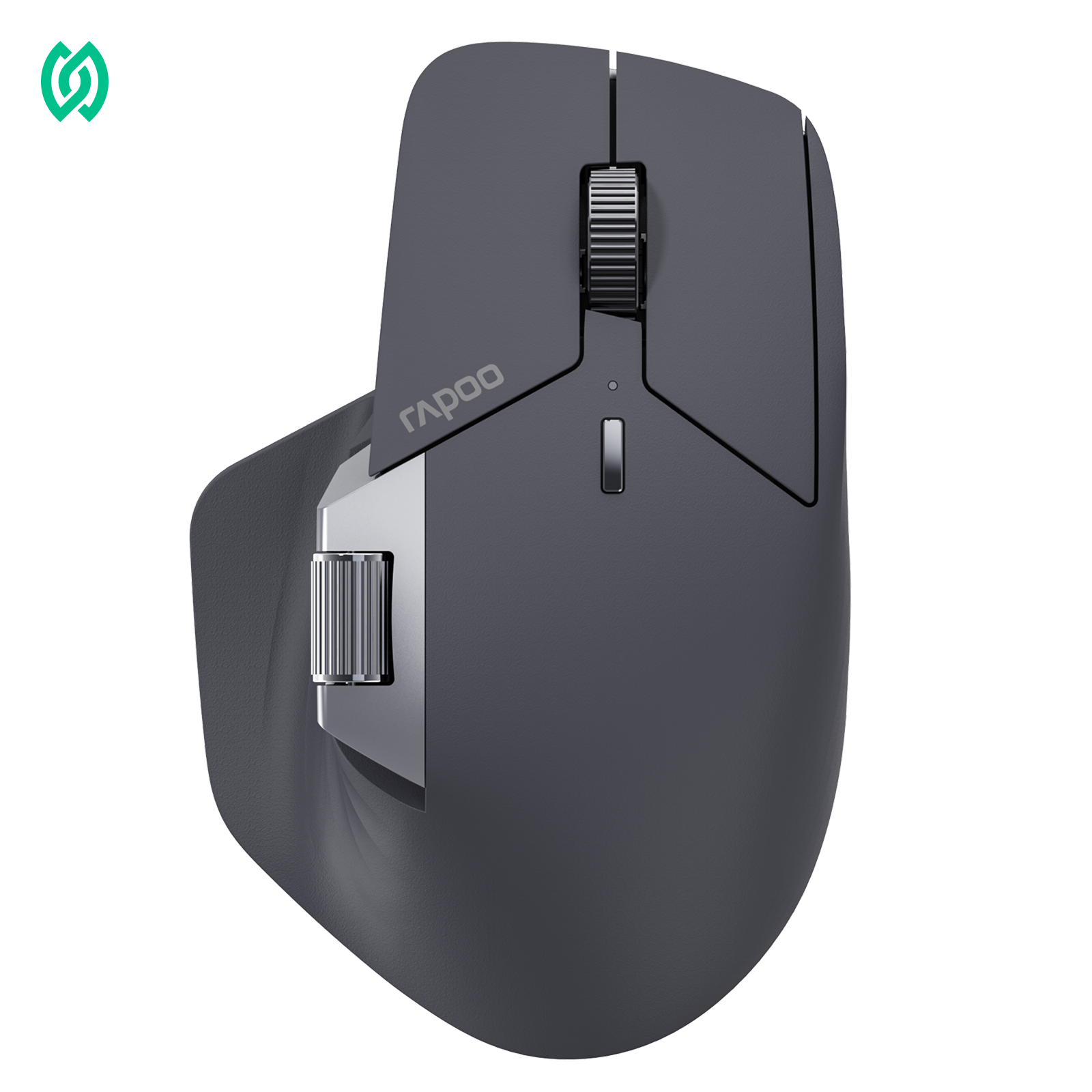
Rapoo MT750 Multi-Device Laser Ergonomic Mouse
Multi-device • Laser tracking • Ergonomic right-hand design
- ConnectionBluetooth + USB receiver (switch between multiple devices)
- SensorLaser sensor (works on many desk surfaces)
- DPI Levels600 / 1200 / 1600 / 3200
- Buttons8 programmable buttons
- ScrollingDual scroll wheels (vertical + side)
- BatteryRechargeable 800mAh • USB charging
Extra savings available — use code RAPOOBg10 at checkout.
In short, laser sensors prioritize surface flexibility, while optical sensors prioritize repeatable tracking feel. Which one feels “better” depends less on specs and more on how consistent you want your mouse to behave on your specific surface.
Optical vs Laser — Surface Compatibility at a Glance
| Surface / Use Case | Optical Mouse | Laser Mouse |
|---|---|---|
| Tracking light source | Visible & Invisible LED Light | Infrared laser light |
| Mouse pad (cloth / matte) | ✅ Excellent, very consistent | ✅ Stable |
| Bare desk (wood / laminate) | ⚠️ Can work, surface-dependent | ✅ Usually works well |
| Glossy or polished desk | ❌ Often unreliable | ⚠️ Works on some finishes |
| Glass surface | ❌ Not recommended without a pad | ⚠️ Sometimes works, not guaranteed |
| Surface flexibility | Lower — prefers non-reflective surfaces | Higher — tolerates more surface types |
| Sensitivity to surface detail | Lower | Higher (can pick up tiny imperfections) |
| Risk of jitter on uneven desks | Low (with a pad) | Higher on imperfect surfaces |
| Best real-world setup | Mouse pad + stable desk | Mixed desks, travel, no pad situations |
Laser mice are often described as “working on more surfaces,” which is generally true. Because laser sensors react to finer surface detail, they can continue tracking on bare desks and unfamiliar surfaces where optical mice may struggle.

The trade-off is that this sensitivity can also pick up tiny imperfections—small dents, glossy coatings, or uneven textures—which may show up as subtle cursor jitter or tracking changes during precise movement.
Optical mice are more surface-dependent, but when paired with a proper mouse pad or matte surface, they usually deliver more predictable and consistent tracking, especially for FPS gaming and precision work.
If you use a mouse pad or a consistent desk setup, optical mice usually feel more stable.
If you frequently work or game on different desks and don’t always have a pad, laser mice offer more surface flexibility, with some trade-offs in consistency.
Optical vs Laser Mouse Accuracy: Why Consistency Beats DPI
When people talk about mouse accuracy, they often think of DPI. In reality, optical vs laser mouse accuracy is about repeatability—whether the same hand movement produces the same on-screen result every time.
DPI only controls cursor speed. It doesn’t guarantee clean, stable tracking. What actually reveals accuracy is feel: slow movements without wobble, clean stop–start behavior, and precise micro-adjustments that don’t glide or slip.
This is where optical sensors usually have an advantage on mouse pads. On cloth or matte surfaces, optical tracking tends to stay more predictable because it relies on consistent surface texture. Laser sensors can feel just as good on certain desks, but their behavior is more dependent on surface finish—especially on glossy or smooth materials.
That’s the difference between spec feel and real feel. Specs describe what a sensor can do in theory; accuracy is what your hand experiences on your desk. The practical rule is simple: choose the sensor that stays most predictable on your surface. That consistency—not raw DPI—is what turns accuracy into confidence.
Before getting into definitions, here’s how optical and laser sensors typically behave when it comes to the issues players actually feel.
Optical vs Laser — Behavior Comparison
| Issue | Optical Mouse | Laser Mouse |
|---|---|---|
| Acceleration feel | Rare; movement usually stays linear | More likely to feel acceleration-like correction |
| Jitter at high DPI | Less noticeable on mouse pads | More noticeable as DPI increases |
| Sensor smoothing | Minimal on common gaming setups | More likely to apply smoothing to clean signal |
| Micro-aim precision | Crisp stops and starts | Can feel slightly soft or “floaty” |
| Surface sensitivity | Stable on pads, less surface-dependent | Behavior changes more with surface finish |
| FPS impact | Easier to build muscle memory | Small inconsistencies are easier to notice |
Why these differences show up in games
When a mouse feels “off,” it’s usually not one big problem—it’s a combination of how the sensor processes movement under pressure. In the optical vs laser comparison, laser sensors are more likely to show acceleration-like behavior, jitter, or smoothing because they process more complex surface data.
Laser sensors often apply subtle correction to keep tracking smooth across different surfaces. In practice, that can feel like laser mouse acceleration, where fast flicks overshoot slightly even though slow movements feel normal. At higher DPI, tiny surface inconsistencies can also become visible as laser sensor jitter, especially during slow tracking.
To hide that noise, some sensors use mouse sensor smoothing, which averages movement over time. While that can make the cursor look steadier, it also means it’s no longer reflecting your exact input in real time. For casual use, this is rarely noticeable—but in FPS games, where aiming relies on repeatable micro-movements and instant stops, even small deviations stand out.
Optical vs Laser Mouse DPI: Why Higher DPI Doesn’t Mean Better Tracking
In the optical vs laser mouse DPI discussion, DPI controls cursor speed—not tracking accuracy.
DPI simply changes how far the cursor moves per inch of hand movement. Higher numbers don’t make tracking cleaner or more precise. In fact, very high DPI can expose jitter or smoothing—especially on laser sensors—because tiny surface noise becomes easier to see.
For most users, a stable DPI paired with in-game or system sensitivity delivers better control than chasing big numbers. Sensors also tend to feel best within a certain usable DPI range, even if higher values are available.
As a practical guideline, lower to mid DPI is easier to control for precision work and gaming, while higher DPI only makes sense for large or multi-monitor setups if tracking remains stable. If your mouse ever feels shaky or “soft,” DPI is one of the first things worth dialing back.
Optical vs Laser Mouse: Lift-Off Distance (LOD)
Lift-off distance (LOD) is how high you can lift the mouse before tracking stops. In the optical vs laser mouse comparison, LOD differences are usually subtle—but they matter a lot if you reposition the mouse frequently.
Optical vs Laser — LOD Behavior Comparison
| Aspect | Optical Mouse | Laser Mouse |
|---|---|---|
| Typical LOD feel | Lower and more controlled | Often slightly higher |
| Repositioning behavior | Cursor stops quickly when lifted | Cursor may move briefly when lifted |
| FPS suitability | Better for frequent lift-and-reset | Can feel less predictable |
| Surface influence | More consistent on mouse pads | More affected by desk surface |
| Office / casual impact | Rarely noticeable | Rarely noticeable |
What this means in real use
LOD becomes noticeable when you lift the mouse to reposition it. If the cursor continues to move while the mouse is in the air, LOD feels higher; if the cursor stops immediately, LOD feels lower. For FPS players, this difference matters because aim resets happen constantly. A lower LOD keeps the crosshair exactly where your brain expects it to be.
This is why optical mice often feel more predictable for competitive play. On mouse pads, optical sensors tend to stop tracking sooner when lifted, reducing accidental cursor movement during resets. Laser sensors, by contrast, can track slightly higher off the surface—especially on hard desks—which may cause small but noticeable cursor drift.
For office work and casual use, LOD is usually a non-issue. If you don’t lift the mouse often, or you move it smoothly without frequent resets, you may never notice the difference between optical and laser in daily tasks.
Surface choice also plays a role. Thicker cloth pads tend to make LOD feel lower, while hard pads or bare desks can make the same mouse feel like it tracks higher—regardless of sensor type.
If you play aim-heavy games, lower LOD is an advantage, and optical mice are often easier to trust. For everything else, don’t overthink it—if lifting the mouse doesn’t move the cursor in a way that bothers you, LOD isn’t a deciding factor.
Optical vs Laser Mouse for Gaming: Which One Is Better?

So, laser or optical—which is better for gaming? The short answer is that both have strengths, but the better choice depends on how you play and what surface you use, not just personal preference.
Laser mice are often praised for their ability to work on almost any surface. Because laser sensors can pick up finer surface detail, they tend to function on bare desks without a mouse pad, which makes them convenient for flexible setups. Many laser mice also advertise very high DPI, which can sound appealing on paper.
However, that sensitivity can be a downside for gaming. High DPI and surface-dependent tracking mean the sensor may react to tiny imperfections you’d never notice otherwise. Small desk dents, glossy finishes, or surface inconsistencies can show up as cursor jitter or subtle tracking changes—exactly the kind of behavior that becomes noticeable in tense gaming moments.
Optical mice are also a strong choice for gaming—and for many players, the preferred one. Optical sensors tend to deliver more consistent, predictable tracking on mouse pads, which is especially important in fast-paced FPS games. Clean stop–start behavior and reliable micro-aim make it easier to build muscle memory and trust your aim under pressure.

RAPOO VT2 MAX Gen-2 Optical Gaming Mouse
53g • 30K Optical Sensor • Up to 8000Hz (wired / 2.4G)
- ConnectionWired + 2.4GHz wireless
- Sensor30K optical • 750 IPS • 50G
- Polling RateUp to 8000Hz
- Switch120M optical switch
- LOD0.7–1.7 mm adjustable
- Weight53g (1.87oz)
- Buttons10 programmable
- Battery800mAh • up to 750 hours
Use code RAPOOBg10 at checkout for extra savings.
The main limitation of optical mice is surface dependency. On reflective or glass desks, optical sensors often struggle to track properly. In those cases, using a mouse pad or desk mat isn’t optional—it’s essential. Once paired with the right surface, however, optical mice usually feel more stable and easier to control during gameplay.
If you value convenience and play on mixed surfaces, a laser mouse can work well. If you care most about consistent aim and competitive performance—especially in FPS games—an optical mouse paired with a good mouse pad is usually the safer and more reliable choice.
For office work, the optical vs laser mouse choice is less about peak performance and more about predictability, comfort, and how often your desk surface changes.

Why laser can be more convenient at work
Laser mice make sense in flexible work environments. If you move between conference rooms, hot desks, cafés, or travel setups, laser sensors are more likely to keep tracking on bare desks or unfamiliar surfaces—often without needing a mouse pad. For people who don’t have a fixed workstation, that surface tolerance is a practical advantage.
When optical makes more sense
Optical mice shine in stable setups. If you always use a mouse pad and want the cursor to feel the same every day, optical sensors usually deliver a more predictable, no-surprises experience. You stop noticing the mouse because it behaves consistently.
What matters more than the sensor at the office

Rapoo MT760 Pro NearLink Multi-Device Wireless Mouse
NearLink • Multi-device • Pro productivity + low-latency control
- ConnectionsNearLink + Bluetooth + Wired (up to 7 devices)
- DPIUp to 12,000 (7 presets)
- PollingUp to 2000Hz
- Buttons11 programmable + onboard memory
- BatteryUp to 120 days + USB-C quick charge
Extra savings available — use RAPOOBg10 at checkout.
In the laser vs optical mouse choice, pick the sensor that stays predictable on your surface and matches how precise your work or gaming needs to be.
Who should Chose Optical Mouse
- You play FPS or competitive games and rely on consistent micro-aim
- You use a mouse pad most of the time and want a “locked-in” feel
- You’re sensitive to float, jitter, or smoothing during slow movements
- You want the same tracking feel every session, every day
Who should laser Optical Mouse
- You often use bare desks, glossy tables, or mixed surfaces
- You work from hot desks, conference rooms, or while traveling
- Convenience and surface flexibility matter more than pixel-perfect aim
- Your use is mostly office work or casual gaming
Two-question mini-quiz (30 seconds):
- What surface do you use most? Mouse pad → lean optical | Bare/mixed desks → lean laser
- What do you do more? Competitive FPS → optical | Office + casual use → either (laser often easier)
FAQ
Is a mouse without visible light always a laser mouse?
A mouse without visible light is not necessarily a laser mouse, because many modern optical mice use infrared (invisible) optical technology. In the past, optical mice commonly used visible red LEDs, which led people to associate “optical” with a glowing light under the mouse. Today, many optical mice instead use infrared LED–based sensors, where the tracking light is invisible to the human eye but the tracking method is still optical—it simply operates at a different wavelength.
The real distinction isn’t whether you can see the light, but the type of light source: optical mice use LED-based tracking (visible or infrared), while laser mice use a laser diode. As a result, a mouse that doesn’t emit visible light is often just a modern, power-efficient optical mouse, not a laser mouse.
Is a laser mouse better than an optical mouse?
A laser mouse isn’t universally better than an optical mouse—it depends on where and how you use it. Laser sensors often work on a wider range of surfaces, including bare desks, but that flexibility can come with subtle tracking inconsistencies. Optical mice, especially on mouse pads, tend to feel more predictable and “locked in,” which is why many users prefer them for precise control.
Which is better for gaming: optical or laser?
For most gaming scenarios, an optical mouse is the safer choice because it usually delivers more consistent tracking on common mouse pads. Competitive games reward repeatable movement more than surface flexibility, while laser mice are generally fine for casual gaming or setups where desk surfaces change frequently.
Which is better for FPS: optical or laser?
For FPS games, optical mice are usually preferred because they stay more consistent during micro-aim adjustments and fast flicks. Predictable tracking makes it easier to build muscle memory, and optical sensors on pads tend to avoid the subtle over-correction or float that some players notice with laser sensors. Lift-off distance and surface stability also play a role, but optical is the common default.
Do laser mice have acceleration?
Laser mice can feel like they have acceleration on certain surfaces or settings, even when operating system acceleration is disabled. This happens because the sensor may apply more correction when movement speed changes, which users perceive as unexpected speed variation. Surface texture and high DPI settings can make this effect more noticeable.
Why do gamers prefer optical sensors?
Gamers often prefer optical sensors because they provide more predictable tracking on mouse pads, which is critical for aim training and muscle memory. Competitive players have very little tolerance for float, jitter, or inconsistency, and optical sensors tend to behave more uniformly in the typical “pad + FPS” setup.
Can an optical mouse work on glass?
An optical mouse can sometimes work on glass, but many struggle unless the sensor and surface are specifically designed for each other. Glass reflects light and lacks usable texture, which makes reliable tracking difficult. In practice, adding a mouse pad or desk mat is the simplest and most reliable solution.
Why does a laser mouse feel “floaty” or inconsistent?
A laser mouse can feel “floaty” because of surface-dependent correction effects like smoothing or subtle tracking adjustments. These changes are especially noticeable during slow, precise movements or on glossy desks. Switching to a mouse pad often changes the feel immediately, which is why surface choice matters so much with laser sensors.
Does DPI matter when comparing optical vs laser?
DPI matters for cursor sensitivity, but it doesn’t automatically translate to better tracking or accuracy. Very high DPI can actually expose jitter or smoothing on some setups, especially with laser sensors. Most users get better control by choosing a stable DPI and adjusting in-game sensitivity instead of chasing maximum numbers.
What is mouse sensor smoothing, and is it worse on laser?
Mouse sensor smoothing is when the sensor averages movement to reduce noise, which can make cursor motion look steadier but feel less crisp. This effect is most noticeable during slow, precise aiming, and some users report noticing it more with laser behavior depending on surface and DPI. While smoothing isn’t always bad, it can reduce fine control for precision tasks.
What is lift-off distance (LOD) and does it differ between optical and laser?
Lift-off distance (LOD) is the height at which the sensor stops tracking when you lift the mouse. It varies by sensor design, tuning, and surface—not strictly by whether the mouse is optical or laser. FPS players tend to care more because frequent repositioning benefits from lower LOD, while most office users rarely notice it at all.
Recommended reading
Mechanical Keyboard vs Normal Keyboard: Which One Should You Buy?
Gaming Mouse vs Regular Mouse: What’s the Real Difference?
Classic Mouse vs Right-Handed Mouse: Which One Is Better for Everyday Use?





