










When choosing a computer mouse, many people don’t realize how much the shape and design can affect daily comfort. At first glance, a classic mouse and a right-handed mouse may look similar—but once you start using them for hours each day, the differences become hard to ignore.
The debate around classic vs right-handed mouse isn’t about which one is newer or more expensive. It’s about how your hand naturally rests, how much support your wrist gets, and how comfortable the mouse feels during long periods of work. A classic mouse, often known as a traditional or standard mouse, focuses on simplicity and ambidextrous design. A right-handed mouse, on the other hand, is shaped specifically to fit the natural contours of the right hand, with ergonomics in mind.
So which one is actually better for everyday use, office work, and long hours at the computer? In this guide, we’ll break down the real differences between classic and right-handed mice—from comfort and ergonomics to practical use cases—so you can choose the mouse that truly fits your daily workflow.
What Is a Classic Mouse?
A classic mouse, sometimes called a traditional mouse or standard mouse, refers to the most common mouse design people have used for decades. Its defining feature is a symmetrical shape, meaning it looks and feels the same on both sides. This design allows the mouse to be used comfortably by both right-handed and left-handed users, which is why classic mice are often described as ambidextrous mice.
In terms of layout, a classic mouse typically keeps things simple: left click, right click, a scroll wheel, and occasionally one or two extra buttons. There are no pronounced curves, thumb rests, or sculpted sides. Instead, the focus is on universality and ease of use. Almost anyone can sit down, grab a classic mouse, and start using it immediately—no adjustment period required.
Because of this straightforward design, classic mice are widely used in office environments, schools, and home setups. They work well for everyday tasks such as browsing, document editing, and light productivity. For users who switch hands frequently, share devices, or prefer a neutral feel, the classic mouse design remains a practical and reliable choice.
That said, the simplicity of a classic mouse also means limited ergonomic support. While it performs well for short sessions and general use, some users may notice reduced comfort during long hours at the computer—especially when compared to a mouse designed specifically around hand posture and wrist support. This is where the differences between classic and right-handed mice begin to matter.
What Is a Right-Handed Mouse?
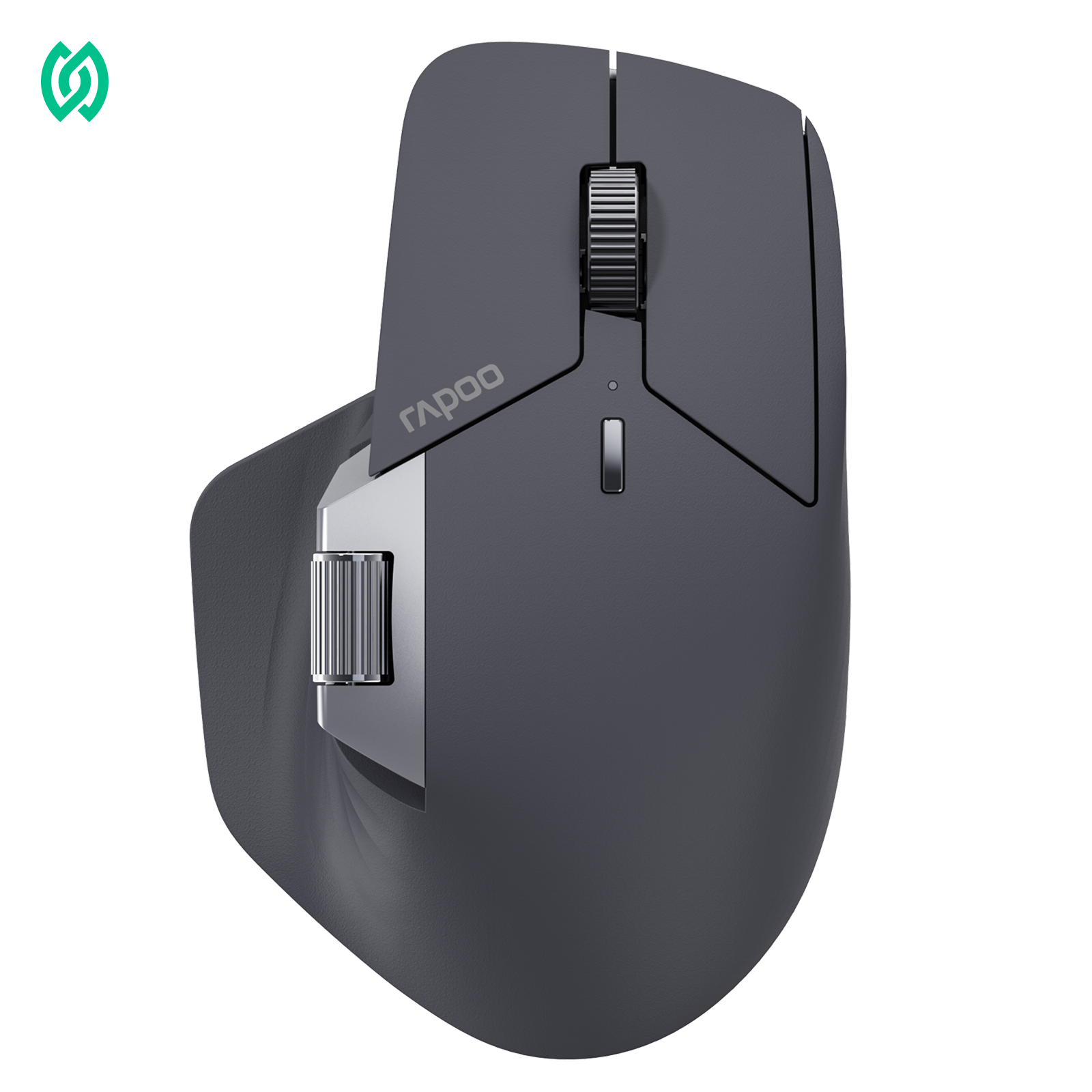
A right-handed mouse is designed specifically to match the natural shape and movement of the right hand. Unlike a classic mouse, which uses a symmetrical form, a right-handed mouse features an asymmetrical design that supports the palm, fingers, and thumb in a more natural resting position.

Most right-handed mice include subtle but important ergonomic elements, such as a contoured right side, a raised palm area, and a dedicated thumb rest. These design choices help guide the hand into a more relaxed posture, reducing unnecessary tension during everyday use. As a result, right-handed mice are often grouped under the broader category of ergonomic mice.
In daily use, a right-handed mouse tends to feel more “locked in” than a classic mouse. The hand doesn’t have to hover or constantly adjust its position, which can improve control and stability—especially during long hours of office work or productivity-focused tasks. For users who spend most of their day at a computer, this added support can make a noticeable difference in comfort.
However, the specialized shape of a right-handed mouse also comes with limitations. Because it’s designed exclusively for right-hand use, it’s not suitable for left-handed users or shared workspaces. There may also be a short adjustment period for users switching from a classic mouse, as the sculpted form encourages a different grip and hand posture.
Overall, a right-handed mouse prioritizes comfort, ergonomics, and long-term usability, making it a popular choice for office professionals and anyone looking to reduce fatigue during extended computer sessions.
Classic Mouse vs Right-Handed Mouse: Key Differences
At a glance, a classic mouse and a right-handed mouse may seem to perform the same basic function—but the real differences become clear once you compare shape, comfort, and long-term usability. These factors play a crucial role in how the mouse feels during everyday tasks, especially for users who spend hours at a desk.

The comparison below highlights how each mouse type is designed, who it’s best suited for, and where each one excels.
Classic vs Right-Handed Mouse Comparison
| Feature | Classic Mouse | Right-Handed Mouse |
|---|---|---|
| Design | Symmetrical, ambidextrous | Asymmetrical, right-hand specific |
| Hand support | Basic, neutral shape | Enhanced ergonomic support |
| Grip comfort | Consistent but minimal | More natural and supportive |
| Learning curve | Very low | Slight adjustment period |
| Long-hour comfort | Average | Better for extended use |
| Typical use cases | Shared workspaces, casual use | Office work, productivity, and gaming |
From a usability standpoint, the classic mouse focuses on simplicity and flexibility. Its symmetrical design makes it easy to use in almost any situation, whether at home, in schools, or in shared office environments. However, this universality often comes at the cost of ergonomic support.
A right-handed mouse, on the other hand, is built around the natural contours of the hand. The sculpted shape helps reduce unnecessary movement and promotes a more relaxed hand posture, which can improve comfort during long periods of work. This makes right-handed mice a popular choice for professionals who prioritize comfort and productivity over universal compatibility.
Ultimately, the key difference isn’t about performance—it’s about how the mouse supports your hand during daily use. That’s why choosing between a classic mouse and a right-handed mouse often comes down to how long you use your computer and how important comfort is to you.
Which Mouse Is Better for Office Work and Long Hours?
When it comes to office work and long hours at the computer, comfort quickly becomes more important than almost any other factor. Tasks like document editing, spreadsheet work, coding, and everyday browsing involve repetitive movements that can place continuous strain on the hand and wrist.
For short, occasional sessions, a classic mouse usually gets the job done without issues. Its neutral, symmetrical design feels familiar and requires no adjustment, which makes it convenient in shared or flexible workspaces. However, as daily usage time increases, some users begin to notice fatigue—especially in the wrist and palm—due to the lack of structured hand support.
A right-handed mouse tends to perform better in long-hour scenarios because its ergonomic shape supports a more natural hand posture. Features like a contoured palm rest and thumb support help reduce unnecessary muscle tension, allowing the hand to stay relaxed over extended periods. This can make a noticeable difference during full workdays, particularly for professionals who rely on precise and consistent cursor control.
It’s also important to note that ergonomic, right-handed designs are not limited to traditional office mice. Many modern right-handed gaming mice are built with long-session comfort in mind, combining ergonomic shapes with responsive performance. For example, models like the Rapoo VT3 Series gaming mouse use a right-handed ergonomic form to support better grip and control, making them suitable not only for gaming but also for productivity-focused users who spend hours at their desks.
Ultimately, for users who work long hours on a computer, a right-handed mouse—whether designed for office use or performance-oriented tasks—often provides a more comfortable and sustainable experience than a classic mouse. The key is choosing a shape that supports your hand naturally throughout the day.
Classic vs Right-Handed Mouse for Different Users
Choosing between a classic mouse and a right-handed mouse often depends less on technical specs and more on how you actually use your computer. Different users have different priorities when it comes to comfort, flexibility, and long-term usability.
Casual and Everyday Users
For casual users who spend limited time on a computer—such as checking emails, browsing the web, or handling light tasks—a classic mouse is often more than sufficient. Its familiar, symmetrical design feels intuitive and requires no adjustment. This makes it a practical choice for households, shared computers, and users who value simplicity over specialization.
Office Professionals and Desk Workers
Office professionals who spend several hours a day working on documents, spreadsheets, or administrative tasks often benefit more from a right-handed mouse. The ergonomic shape helps support the hand during repetitive movements, making long sessions feel less tiring. For users focused on productivity and daily comfort, the added hand and wrist support can significantly improve the overall experience.
Gamers and Performance-Focused Users
Many gamers assume that performance automatically means a symmetrical design, but in reality, right-handed gaming mice are extremely common. A right-handed shape can provide a more secure grip, better control, and improved stability during fast or precise movements. This is why gaming mice like the Rapoo VT3 Series use a right-handed ergonomic design—to balance performance with comfort during extended gaming sessions.
Users Switching Between Work and Play
For users who use the same mouse for both work and gaming, a right-handed ergonomic mouse often offers the best balance. It provides enough comfort for long office hours while still delivering the control and responsiveness needed for gaming. This makes it an ideal all-in-one solution for people who don’t want to switch devices throughout the day.
Left-Handed or Shared-Workspace Users
In shared environments or for left-handed users, a classic mouse remains the most practical option. Its ambidextrous design ensures that anyone can use it comfortably without needing to adjust grip or hand position, making it ideal for schools, libraries, and multi-user offices.
Should You Switch from a Classic Mouse to a Right-Handed Mouse?
Switching from a classic mouse to a right-handed mouse isn’t something everyone needs to do—but for the right users, it can be a meaningful upgrade. The key question isn’t whether one mouse type is objectively better, but whether your current mouse still fits your daily usage habits.
You may want to consider switching to a right-handed mouse if:
- You spend long hours each day working at a computer
- You often feel hand, palm, or wrist fatigue after extended use
- You want a mouse that feels more stable and “locked in” during precise tasks
- You use the same mouse for both work and gaming
In these cases, the ergonomic shape of a right-handed mouse can provide better long-term comfort by supporting a more natural hand posture. Many users notice the difference not immediately, but after several days of consistent use—especially during full workdays.
On the other hand, sticking with a classic mouse still makes sense if:
- Your computer use is short or occasional
- You frequently share your mouse with others
- You are left-handed or switch hands regularly
- You simply prefer a neutral, no-adjustment design
It’s also normal to experience a short adjustment period when moving from a classic mouse to a right-handed one. The sculpted shape encourages a slightly different grip, but most users adapt quickly once the hand settles into a more relaxed position.
Ultimately, switching is less about changing habits and more about supporting how you already work. If comfort and long-term usability are priorities, a right-handed mouse—whether designed for office use or performance-focused tasks—can be a worthwhile step forward.
Frequently Asked Questions (FAQ)
Is a right-handed mouse better than a classic mouse?
A right-handed mouse is generally better for users who spend long hours at a computer. Its ergonomic shape supports a more natural hand posture, which can improve comfort and reduce fatigue. A classic mouse, however, works well for short sessions, shared use, or users who prefer a neutral, ambidextrous design.
What is the main difference between a classic mouse and a right-handed mouse?
The main difference lies in shape and ergonomics. A classic mouse has a symmetrical design suitable for both hands, while a right-handed mouse is shaped specifically for right-hand use, offering better palm and thumb support for long-term comfort and control.
Is a classic mouse bad for long hours of use?
A classic mouse is not bad for long hours, but it may offer less support over time. For extended daily use, some users experience hand or wrist fatigue due to the lack of ergonomic shaping. In such cases, a right-handed mouse can provide a more comfortable experience.
Are right-handed mice only for office work?
No. Right-handed mice are not limited to office use. Many gaming mice use right-handed ergonomic designs to improve grip, control, and comfort during long gaming sessions. For example, right-handed gaming mice like the Rapoo VT3 Series are designed for both performance and extended use.
Which mouse is better for office work and productivity?
For office work and productivity, a right-handed mouse is often the better choice—especially for users who work several hours a day. Its ergonomic shape helps reduce strain and supports consistent, precise movements. A classic mouse remains suitable for light tasks or shared office environments.
Can left-handed users use a right-handed mouse?
Left-handed users can technically use a right-handed mouse, but it is not ideal. The asymmetrical shape is designed specifically for right-hand use and may feel uncomfortable for left-handed users. In most cases, a classic or ambidextrous mouse is a better option.
How long does it take to adjust to a right-handed mouse?
Most users adjust to a right-handed mouse within a few days. The sculpted shape encourages a slightly different grip, but once the hand adapts, many users find it more comfortable—especially during long work sessions.
Final Thoughts
There’s no single mouse that works best for everyone. The real difference between a classic mouse and a right-handed mouse comes down to how long you use your computer and how important comfort is in your daily routine. A classic mouse remains a practical, flexible option for short sessions, shared environments, and users who prefer a neutral design.
For users who spend hours at a desk—whether working, creating, or gaming—a right-handed mouse often provides a more comfortable and sustainable experience. Its ergonomic shape supports a natural hand posture, helping reduce fatigue over time. Ultimately, the best mouse is the one that fits your hand, your habits, and your workflow—day after day.





